

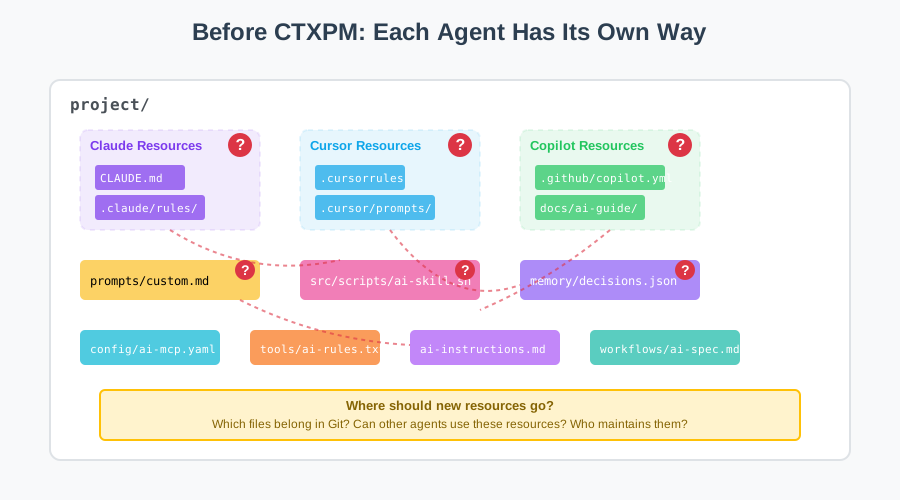
Use AI coding agents long enough, and your project starts collecting things beyond prompts.
You might have rules constraining code style, skills handling routine tasks, specs describing product boundaries, MCP configs connecting external services, and memories recording past decisions. Some come from open source communities, some are team assets, and others apply only to the current project.
At first, dropping them into the project works fine. Problems arrive later, when the project grows, you switch agents, or you return after a few months: Which files belong in Git? Have external resources been updated? Does this rule apply to the whole team or just this repository?
AI workflows get messy when resources have no boundaries.
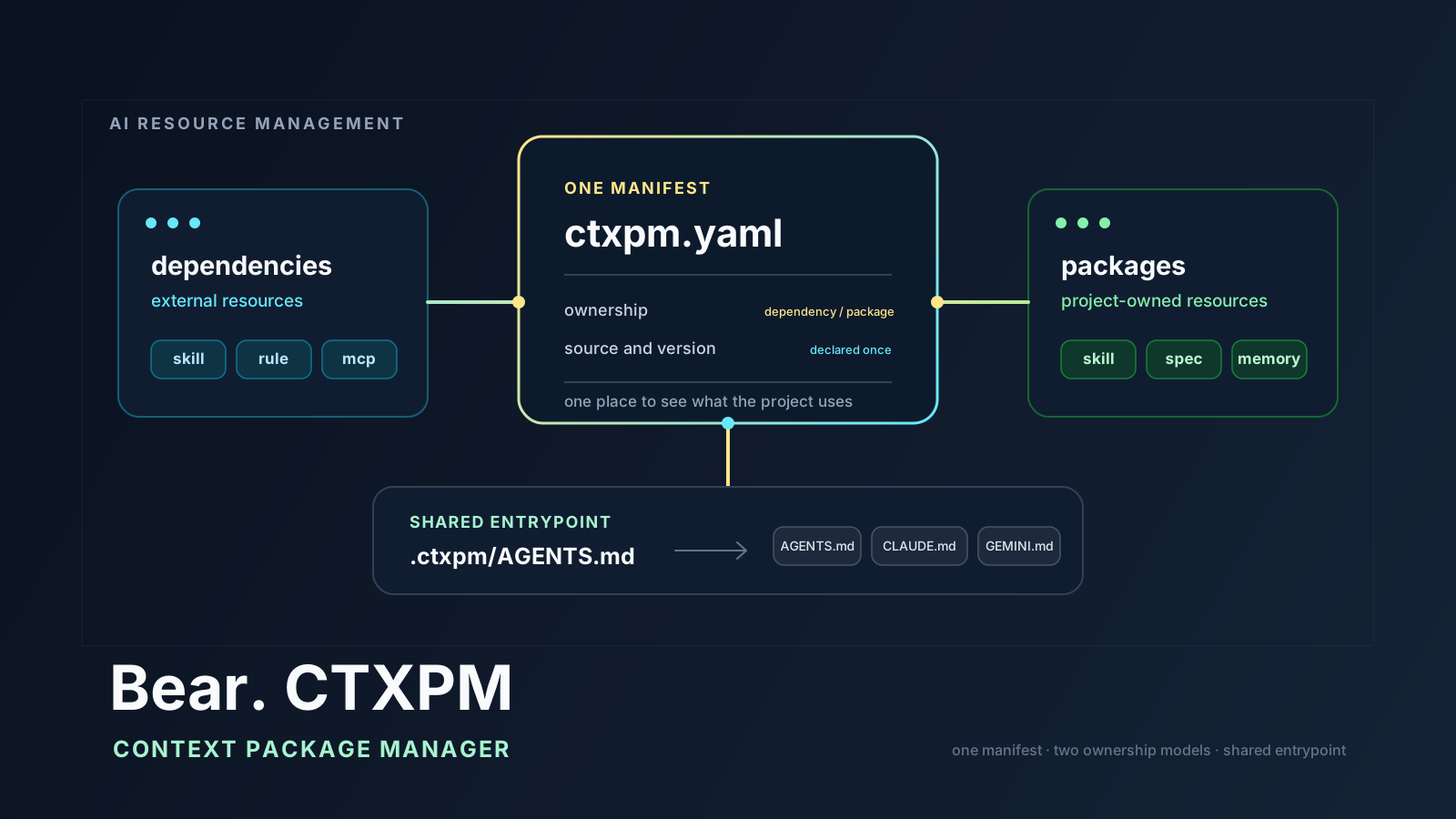
Bear. CTXPM starts from that problem. CTXPM stands for Context Package Manager. It's an open source protocol for managing AI resources, with a matching ctxpm CLI. It organizes the context and capabilities AI uses the same way you organize project code.
Unlike traditional package managers that require developers to manually type various commands for installation, updates, and validation, CTXPM uses an AI-first design. The protocol rules and operational logic are injected through agent entry documents. Combined with built-in skills and CLI tools, AI agents can autonomously check, upgrade, validate, and organize resources during routine coding, reviews, and debugging. You don't need to memorize subcommand parameters. The AI reads the protocol, calls the tools, and confirms decisions with you when needed.
Start by treating it as a project protocol
Bear. CTXPM doesn't ask you to rewrite existing skills, rules, or prompts. It doesn't require the project to bind to a specific agent. It first establishes a few things you can't avoid in real work:
- What AI resources does the project have?
- Are they external or maintained by the project itself?
- Where should resources be stored, and should they enter version control?
- From which entry point should different AI agents read them?
- How do you install, validate, migrate, and update these resources?
This agreement lands in three places: the ctxpm.yaml manifest, the .ctxpm/ directory structure, and the agent entry documents in the project root. The CLI makes installation, detection, and validation more reliable, but the protocol itself doesn't depend on the CLI. Even if the current environment can't run the tool, AI can still understand the project from the manifest and directory.
Two semantics, clear resource boundaries
Bear. CTXPM uses only two ownership semantics: dependency and package.
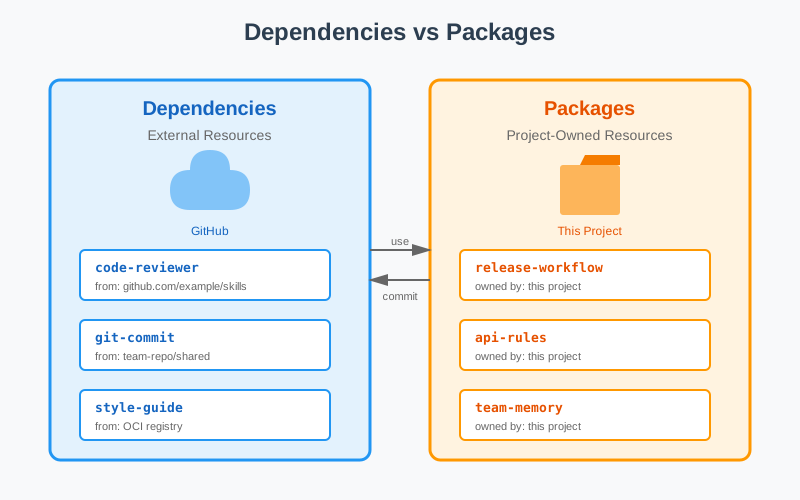
dependency is an external AI resource the project uses. Sources can be Git repositories, OCI registries, file paths, or other locations. The full content usually isn't committed to the current project, but ctxpm.yaml records its source, path, and stable version, similar to third-party dependencies in code projects.
package is an AI resource the current project maintains itself. It relates to the project's business logic, code structure, or collaboration methods. It should be committed and reviewed with the source code, and modified along with the project.
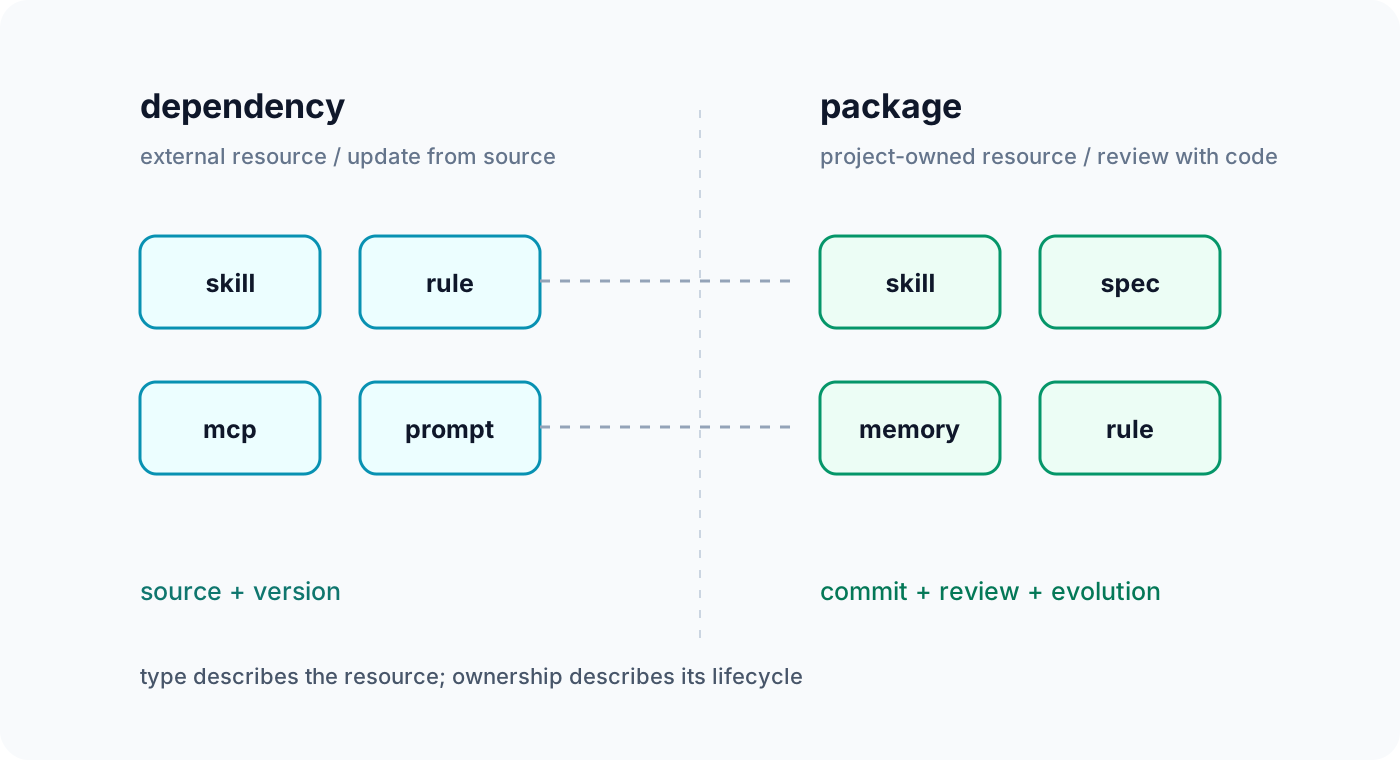
Resource ownership and resource type are separate. Whether dependency or package, resources can belong to these types:
skillrulespecpromptmemorymcp
For example, a code commit skill imported from GitHub is dependency + skill. A release workflow specific to the current repository is package + skill. The project's own source code editing boundaries could be package + rule.
This way, who maintains a resource and who to ask when something breaks no longer get mixed together.
What a real directory looks like
Projects adopting Bear. CTXPM generally have this structure:
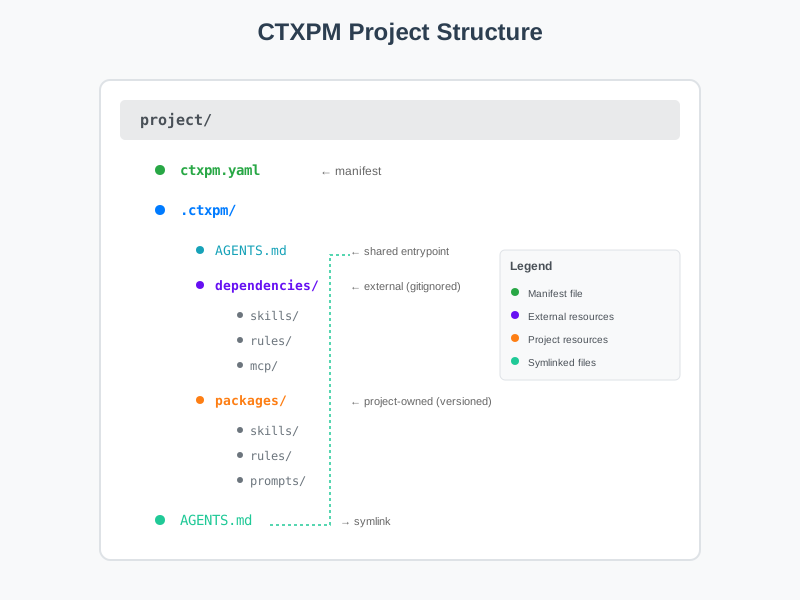
ctxpm.yaml is the project's resource manifest. Installed external resources go in .ctxpm/dependencies/, usually added to .gitignore. Project-maintained resources go in .ctxpm/packages/, usually under version control.
.ctxpm/AGENTS.md is the shared agent entry source file. Based on enabled agent profiles, the project can generate AGENTS.md, CLAUDE.md, GEMINI.md, and other compatible entries in the root directory, all pointing to the same content. Rules are maintained once, entry files accommodate different agent conventions.
The entry document also tells AI how to discover resources. Read the project manifest first, then the project's own packages, then external dependencies. Only load the corresponding memory when the task requires historical background. The context won't get filled with every file from the start.
This is the key to AI-driven design: The protocol isn't static configuration but an operational guide for AI. The AI reads resources by priority, decides which rules apply to the current task, and executes resource checks and maintenance operations at appropriate moments. Developers don't need to interrupt coding to manually execute these processes.
How this repository uses CTXPM
The Bear. CTXPM repository itself follows these rules. The management capabilities of ctxpm and the third-party git-commit skill are external dependency. The release workflow serving only this repository is package + skill. The constraint reminding not to mix product source code with the repository's own managed resources is package + rule.
The corresponding manifest can be simplified as:
version: 1.0

project:
  name: Bear.CTXPM

agents:
  - generic
  - claude-code

dependencies:
  - name: ctxpm
    type: skill
    path: .ctxpm/dependencies/skills/ctxpm
    source:
      type: git
      url: https://github.com/gBearBest/Bear.CTXPM

packages:
  - name: ctxpm-release
    type: skill
    path: .ctxpm/packages/skills/ctxpm-release

  - name: ctxpm-source-boundary
    type: rule
    path: .ctxpm/packages/rules/ctxpm-source-boundary.md
The manifest's job is to write down responsibilities. AI entering the repository later can know which content updates with upstream, which content the current project is responsible for, and which rules to read before modifying source code.
From one-time installation to AI-maintained processes
Traditional package managers require you to memorize commands, check documentation, and manually trigger checks. CTXPM turns these steps into a protocol AI can understand and execute:
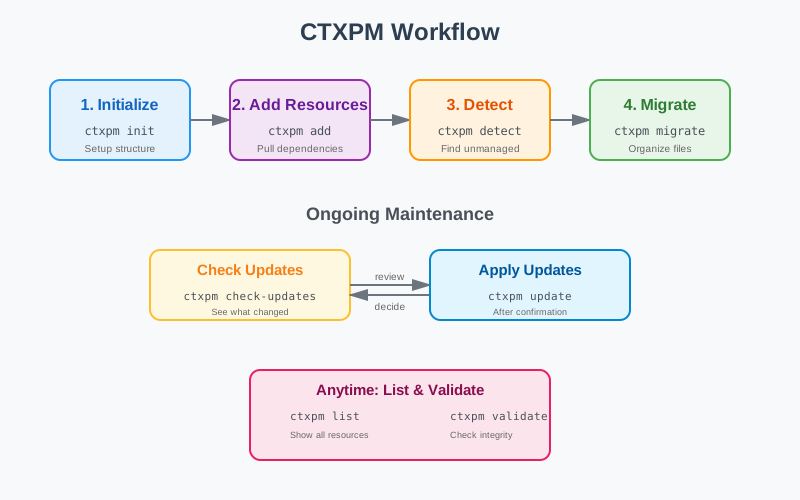
You can run these commands yourself, or hand them to AI. After a project adopts the CTXPM protocol, AI agents will, while handling routine tasks:
- Discover unmanaged AI resources in the project and ask if migration is needed.
- Check whether external dependencies have updates at appropriate times.
- Verify the manifest matches the actual directory and automatically fix entry symlinks.
- When encountering resource conflicts or unclear ownership, confirm handling with you.
AI doesn't just execute fixed scripts. It understands the protocol's semantic boundaries, judges what should be done based on project state, when to do it, and whether confirmation is needed.
detect and migrate handle legacy resources: read-only scanning first, then user confirmation on what to migrate. check-updates and update are also deliberately separated: discover changes and report first, then execute updates after confirmation.
For regular external Git resources, Bear. CTXPM records the commit where the resource path last changed, not necessarily the repository's latest HEAD. When a large repository changes only other directories, the dependent skill won't show a false upgrade. The version number corresponds to the actually installed resource root directory.
Protocol first, AI understands boundaries, tools handle repetitive work
Bear. CTXPM defines the protocol first because projects can't depend on a binary tool for AI to understand the work environment. The protocol injects through entry documents to let AI know:
- Where resources are stored, which are managed, which are scattered.
- Where external dependency boundaries are, when to check for updates.
- Which rules to read before modifying, which manifests to sync after modifying.
- When encountering resources with unclear ownership, whether to ask or ignore.
Creating directories, fixing entry symlinks, installing dependencies, calculating versions, checking unmanaged resources, validating manifests—these fixed steps suit the CLI. How to judge resource ownership, explain risks, whether to request confirmation, and how to handle migration conflicts are left to AI.
The protocol clarifies the rules, the CLI makes fixed steps stable, and AI understands semantic boundaries and handles parts requiring judgment. This way, developers can focus on the decision layer instead of memorizing and repeatedly executing fixed commands.
What AI does, what you do
After adopting CTXPM, daily resource management work is mainly done by AI:
AI executes autonomously:
- Scans the project and discovers unmanaged AI resources.
- Reads
ctxpm.yamlto understand resource ownership and dependency relationships. - Checks whether external dependencies have updates at appropriate times.
- Fixes entry symlinks to keep directory structure consistent.
- Loads resources by priority to avoid context waste.
You only make decisions:
- Should scattered resources migrate to
packagesor be marked asdependency? - External dependencies have new versions, should you upgrade?
- When rules conflict, which one to keep?
This is completely different from traditional tool experiences. npm install requires you to remember commands, check documentation, and trigger manually. CTXPM's AI agent checks project state in the background while you code, review, and debug, and proactively asks for your decisions when it finds problems.
Who should use CTXPM
One-off AI demos might not need CTXPM. After a project starts long-term maintenance, these situations are common:
- Multiple agents need to read the same set of project rules.
- Teams want to reuse shared skills without copying them into every repository.
- The project's own prompts, specs, and memories need review alongside source code.
- External resources need known sources, versions, and update boundaries.
- Historically scattered AI files need inventory before migration.
CTXPM doesn't write prompts for you, and it doesn't decide which agent is smarter. It clarifies resource ownership, location, and lifecycle so AI workflows can be maintained along with the project.
How to get started
When you start integrating, hand this sentence to the AI agent you're using:
Please detect, install, initialize, and transform this project according to the instructions in https://raw.githubusercontent.com/gBearBest/Bear.CTXPM/latest/INSTALL.md to make it a Bear.CTXPM protocol structure for managing AI dependencies and AI resources.
AI will first identify the agents and existing resources the project is using, then prepare the project-local CLI, initialize directories and manifests. When it encounters resource ownership or migration issues, it will stop and ask you to confirm.
From this step on, CTXPM's maintenance process switches to AI-driven mode. After that, when you work on the project normally, AI will in the background:
- Discover scattered resources and ask whether to bring them under management.
- Check external dependency updates, report changes, and wait for confirmation.
- Fix entry symlinks to keep project structure consistent.
- Read protocol rules and decide when to load which resources.
If the project has already accumulated rules, skills, prompts, or memories, clarifying boundaries early will save a lot of organization work later. Bear. CTXPM focuses on this step: giving existing context a place to live and knowing who maintains it. Throughout the process, you only make decisions. Leave the other steps to AI and tools.
Project address: github.com/gBearBest/Bear.CTXPM